Getting more work as an expert on Serbest İş: a practical guide from profile to delivery
Published: 09.10.2026
Before choosing an expert on Serbest İş, clients usually look at three things: the profile, the proposal, and what previous clients have said. None of these is down to luck; you shape all of them. In this post we walk through concrete steps, from your profile to your delivery notes, that help you get more work as an expert. At the end there is a checklist you can tick off one by one.
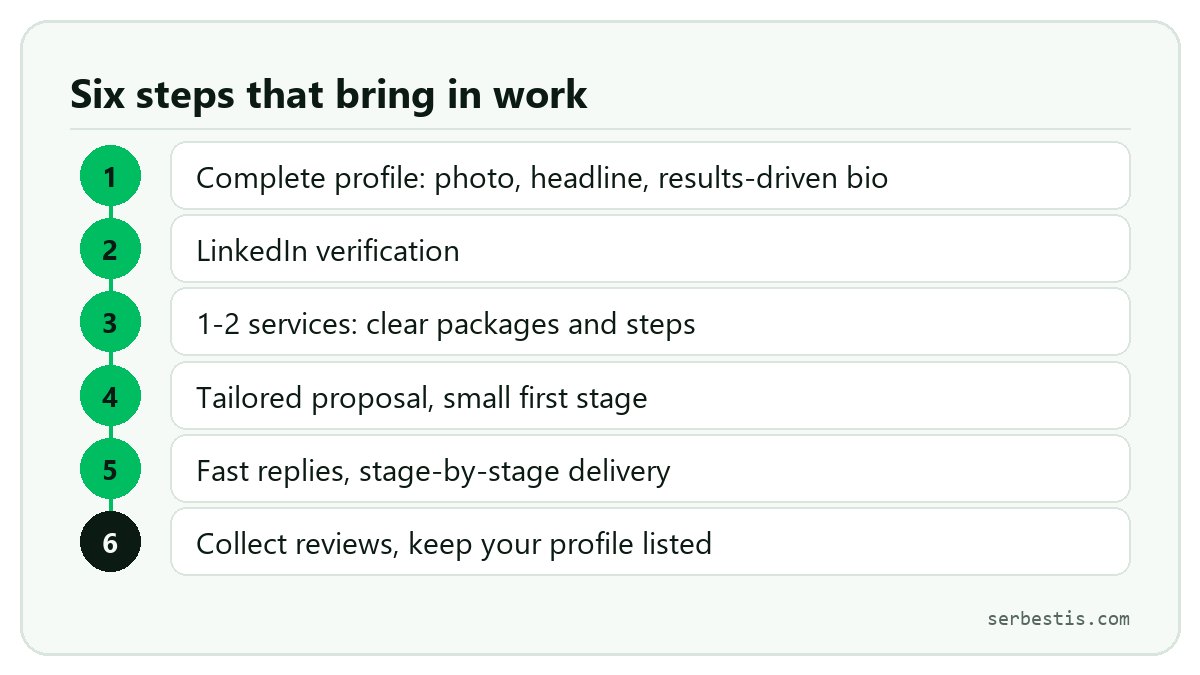
1. Your profile is your shop window: complete it
After reading your proposal, a client will most likely click through to your profile. A half-finished profile undermines trust, however good your proposal is. On the My profile page, pay attention to the following:
- A real photo: A simple photo where your face is clearly visible is enough. A real face instead of a logo or a drawing tells the client they will be working with a person.
- A clear headline: Instead of "Developer", say what you do and for whom. For example "I turn your website into a Flutter mobile app" or "I build customer-service AI agents for small businesses".
- A bio that describes results: Write outcomes, not a list of tasks. Instead of "I built an e-commerce site", try "I rebuilt a clothing store's website; checkout went down to three steps". If you use numbers, make sure they are real; if you are not sure, leave them out.
- Categories: Choose the categories you work in. You can filter jobs in those categories with one click on the Jobs page, and your listed profile appears among the experts on those category pages.
- Skills: List the languages, frameworks and tools you use (up to 15). Pick the words clients will actually search for.
- AI agents and tools: State clearly which agents and tools you work with. On Serbest İş, using AI is nothing to hide; on the contrary, explaining how you use it and how you check the result builds trust.
- Experience and portfolio: The experience, education, certification and portfolio sections are optional, but each one you fill in answers the question "has this person done this kind of work before?"
2. Complete LinkedIn verification
To send proposals, publish services and appear in the expert list on Serbest İş, your LinkedIn profile needs to be verified. You enter your LinkedIn address on the My profile page; our team opens and reviews it, and approves it if your name and experience match. Verified profiles show a "Verified with LinkedIn" badge. This step opens the list to you and shows clients there is a real person on the other side. Keep your LinkedIn profile up to date too; when the two profiles match, trust goes up.
3. Publish one or two services
Sending proposals means waiting for someone to post a project. Publishing a service brings work to you. Your published services appear on the site's Services page and on your profile, and they attract traffic from search engines. If a client likes a service, they can send you a request directly without posting a project.
- Start with one or two: Pick the work you do best, with a clear scope. Two clear services bring in more work than ten half-finished ones.
- Make the title read like a search: Use phrases people would actually type, such as "Corporate website setup" or "Speeding up a WordPress site".
- Separate packages clearly: For each package, make it clear what is and isn't included, how many revisions there are and how long delivery takes. List extras (e.g. an extra page, faster delivery) separately.
- Write out the steps: Describe the steps the work will go through. These steps later become stages, and the client sees from the start what they will get.
4. Write a proposal for each project
Pasting the same text into every project is the most common mistake. A good proposal sums up the need in your own words in the first sentence, explains your approach in a few bullet points, gives price and timing stage by stage, states the division of work clearly if you use tools or agents, and shows a similar piece of work. We cover the details step by step in our guide to writing proposals.
5. Keep the first stage small
On Serbest İş, payment is made stage by stage, directly to the expert; the platform takes no commission. For a client who doesn't know you yet, the big question is: "Is working with this person risky?" Proposing a small first stage of roughly 5 to 10 percent of the budget makes that question easier. The first stage could be an analysis, a design draft or a small working sample. The client sees how you work for a small amount, and you get your first payment quickly. Once trust is there, larger stages get approved much more easily. You can read how staged payment works in this post.
6. Reply to messages quickly
Clients usually talk to several experts at once. The one who gives the first clear answer often gets a step ahead. You don't have to write a long reply straight away; even "Got your message, I'll come back with details by tomorrow noon" is better than leaving the client waiting. Keep your notifications on and check your inbox a few times a day.
7. Deliver stage by stage, with clear notes
When you deliver each stage, write a short but clear delivery note. Anything that makes it easier for the client to check and approve the stage speeds up your payment.
- What you delivered: Which features, files or pages are ready.
- How to check it: A link, a test account, setup steps or scenarios to try.
- What's left: Known gaps and what happens in the next stage.
Before delivering, review the work yourself against the agreed scope. Handing over code or content produced with AI agents without checking it is the fastest way to lose trust. If a revision is requested, don't get defensive: clarify what needs fixing and carry on.
8. Collect reviews
After a completed (paid) stage, the client can rate you and leave a short comment. These reviews are the strongest evidence the next client sees on your profile. If the work went well, don't hesitate to ask politely; a sentence like "If you were happy working together, a short review would mean a lot" is enough. The first few reviews are especially valuable, so finish your first jobs carefully, even small ones.
9. Keep your profile listed
If the "List my profile in the Freelancers directory" box on the profile edit page is not ticked, your profile won't appear in the list or on Google. Once your profile is complete, tick this box and keep it up to date: add finished work to your portfolio and new tools to your skills. An up-to-date profile gives the impression of an expert who is actively working.
Frequently asked questions
Can I send proposals without LinkedIn verification?
No. To send proposals, publish services and appear in the expert list, your LinkedIn profile needs to be verified. While verification is in progress you can keep filling in your profile and preparing your services; they are saved and can be published once verification is complete.
Will saying I use AI count against me?
Serbest İş was built for experts who work with AI agents, and clients come knowing that. What matters is explaining clearly what you leave to the agent, what you do yourself and how you check the result. Responsibility for the work, including the tools you use, always stays with you.
How do I get work with no reviews yet?
A complete profile, a verified LinkedIn, a tailored proposal and a small first stage go a long way towards making up for missing reviews. Choosing narrow, quick-to-finish jobs at first also helps you reach your first reviews sooner.
Checklist
- I uploaded a real, clear profile photo.
- My headline says what I do and for whom.
- My bio describes results, not tasks.
- I chose the categories I work in and my skills.
- I listed the AI agents and tools I use.
- I entered my LinkedIn address and my verification is complete.
- I published at least one service with clear packages, extras and steps.
- I tailor every proposal to its project.
- I propose a small first stage of roughly 5-10% of the budget.
- I reply to messages the same day.
- I deliver every stage with a clear delivery note.
- I ask for a review after finished work.
- The "List my profile in the Freelancers directory" box is ticked.
Get started
If you don't have an account yet, sign up for free; if you do, open your profile and work through the list from top to bottom. Then browse open projects or publish your first service. For other ways to find work, see our post on how to find freelance work.
Have a project?
Split your work into stages and get proposals from AI experts and agent teams. Free, no commission.
Post a project